 Data 360 Inspector
Features · Segments and activation
Segments
Criteria in plain words, counts, equivalent SQL and publish history.
Video coming soon.
From the article Why does my Data Cloud segment count not add up? (part 17 of the series).
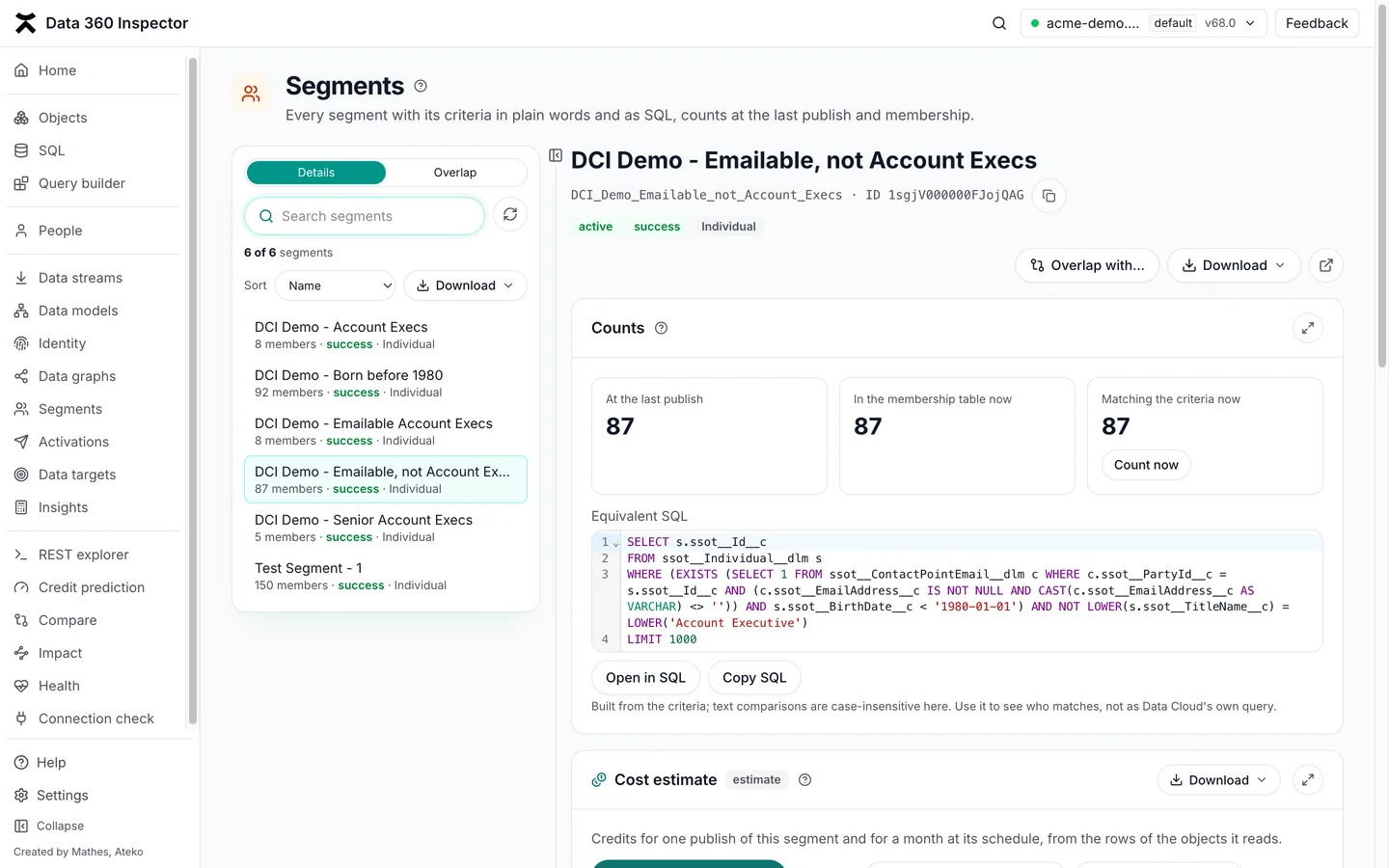
On my demo org, the segment Born before 1980 has 92 members. A second segment, Emailable, not Account Execs, takes people born before 1980, keeps those with an email address, leaves out the Account Executives, and lands on 87. Is 87 right, and is it still right today? Data Cloud has more than one number for a segment, they are counted at different times, and Segment Builder does not put them next to each other.
The list
Segments in the sidebar lists every segment in the org, loaded page by page and kept while you visit other pages. Each row shows the member count at the last publish, the publish status and the object the segment is on, such as "87 members · success · Individual".
Search finds a segment by name, API name or the start of its ID. Sort offers Name, Newest created, Latest refreshed, Latest changed and Most members, and the choice is remembered in your browser. Download gives the list, as filtered and sorted, with members at publish, publish status, schedule, object, status, type and dates.
The Details and Overlap switch at the top of the list is for Day 19.
Three counts that should agree
Pick a segment and the first card is Counts, with three tiles:
- At the last publish: the count Data Cloud stored on the segment when it last published.
- In the membership table now: the rows for this segment in the object's latest membership table, counted with SQL.
- Matching the criteria now: empty until you press Count now, which runs the segment's criteria as SQL.
For Emailable, not Account Execs all three say 87, so the answer to the opening question is yes.
When the third number differs from the first, the card says by how much and gives the two usual reasons: the data changed since the last publish, or the SQL differs from how Data Cloud reads a rule.
The middle number has its own trap. An org can have more than one set of membership tables for the same object. The Inspector first reads the latest table that pairs with the segment's history table, and when that table has nobody for the segment, it checks the object's other latest tables and uses the first one that has rows.
If none has rows, the Members card says which tables it checked. For a segment that published successfully with members, it also explains why: the count at the last publish is stored on the segment record and does not read the membership tables. They can be empty when the segment publishes only to activation targets that do not keep membership, when the rows sit in another data space, or when the last publish is older than the table keeps rows. That explanation came from a user who saw 0 in the middle tile for a segment that clearly had members (feedback #1076).
The equivalent SQL
Inside the Counts card sits Equivalent SQL: a SELECT of the IDs of the records that match the criteria now, built from the criteria, with Open in SQL and Copy SQL.
The translation covers the common operators: equal and not equal, in and not in, contains, begins with, ends with, greater and less than, between, before and after for dates, has a value and has no value, true and false. A rule on another object becomes an EXISTS through a direct relationship from the metadata. A count rule on related records is translated as well: the segment builder saves "has an email" as "at least 1 related ContactPointEmail record", and the SQL above checks exactly that. Exclude criteria are added with AND NOT, as the last line of the SQL above shows for the Account Executives.
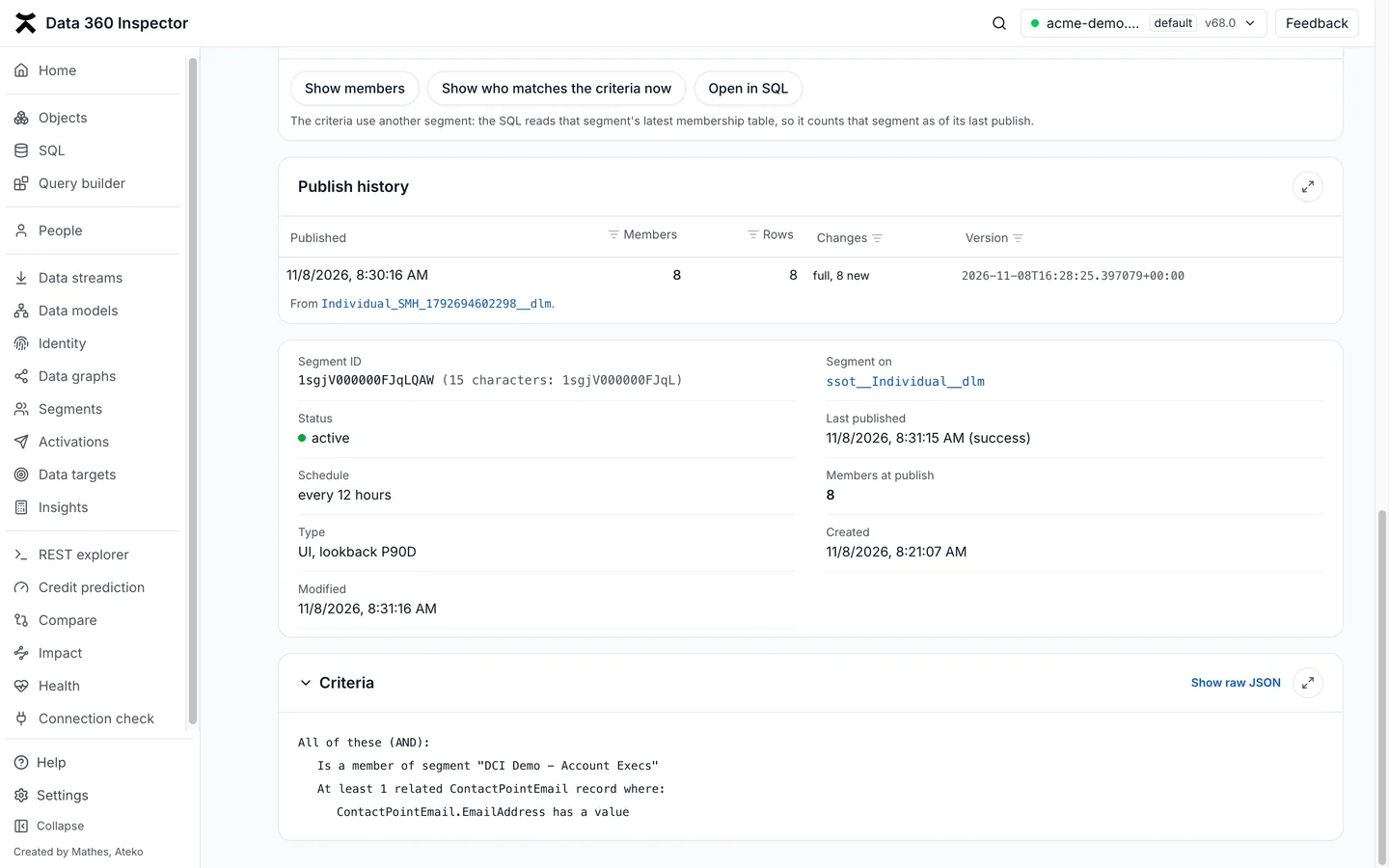
A rule on another segment (a nested segment) is resolved by the segment's developer name and reads that segment's latest membership table. It counts that segment as of its last publish, and the page says so under the Members card: "The criteria use another segment: the SQL reads that segment's latest membership table, so it counts that segment as of its last publish." (feedback #1078).
When a rule cannot be translated, the card says which one and why instead of guessing. Today that is a count rule that sums or averages a related field, and a rule that follows a path of more than one relationship. Data Cloud's own counts above are not affected.
The note under the SQL is worth repeating: text comparisons are case-insensitive here, so use the SQL to see who matches, not as Data Cloud's own query.
Who is in it
The Members card lists people, 100 at a time in ID order, with Load 100 more. Show members reads the latest membership table, with each person's name and the time they were added. Show who matches the criteria now uses the equivalent SQL instead, which is the only option for a segment that never published, because Data Cloud fills the membership tables only when a segment publishes. Each name opens the person on People, and Open in SQL gives you the same query with a limit of 1,000.
Publish history
Publish history reads the object's membership history table and shows one row per publish, newest first, with Published, Members, Rows, Changes and Version, and a link to the history table on the Objects page. The demo segments have published once each, so the table has one row: "full, 8 new" for Emailable Account Execs. With more than one publish, a bar chart, Size over time, sits above the table.
Hovering a bar of the chart (or moving to it with the keyboard) shows the members at that publish, the change since the publish before with a percentage, whether the snapshot was full or incremental, the rows by type and the version stamp.
This is where a sudden drop shows up. A segment that went from thousands to a few hundred overnight usually points at a data stream that loaded less, or a criteria change the day before.
Criteria in plain words
The Criteria card sits at the bottom of the page, folds open and closed, and remembers whether you left it open. Inside, every rule is one indented line:
- Groups read "All of these (AND):" or "Any of these (OR):".
- Conditions read like
Individual.BirthDate is before "1980-01-01", orCloseDt is in the last 16 daysfor relative dates. - Count rules read
At least 1 related ContactPointEmail record where:, followed by their own conditions. - A nested segment reads
Is a member of segment "DCI Demo - Account Execs".
A segment with exclusions gets two parts, "Include:" and "Exclude anyone who matches:"; on Emailable, not Account Execs the second part reads Individual.TitleName is "Account Executive". A rule the Inspector does not recognise is shown as raw JSON under its line rather than described wrongly. Show raw JSON gives the whole include and exclude criteria in the JSON viewer.
Between the history and the criteria sits a details panel: segment ID (with the 15-character form the membership tables use), object, status, last published, schedule in words (such as "every 12 hours" or "not scheduled"), members at publish, type with its lookback, created and modified.
Limits
A few things to know:
- The equivalent SQL is my translation of the criteria. An operator Data Cloud sends that it does not know is reported rather than guessed.
- Count now and both membership counts are SQL queries and use Data Cloud query credits. Count now runs only when you press it.
- The size of each publish is worked out from the history rows: a full snapshot counts its members minus those leaving, an incremental one changes the size before it. Only full snapshots have been seen live.
The Inspector is free on the Chrome Web Store: https://chromewebstore.google.com/detail/data-cloud-inspector/ghiojkipoephhlkcgcgochoihogiahog