 Data 360 Inspector
Features · Personalization and marketing
Personalization decisions
Explain a decision, try one, recommender quality and experiment readouts.
Video coming soon.
From the article Why did this person get that banner? Explaining Personalization decisions (part 31 of the series).
The question after "is Personalization set up?" is always about one person. A marketer tests the home page as a known customer and gets the generic banner instead of the loyalty offer. Is the customer outside the loyalty segment, is a higher-priority decision winning, or is the customer in the control cohort of an experiment?
The page still needs Personalization turned on in Settings > Pages.
Explain a decision
Explain a decision takes a personalization point and an Individual ID and walks the point's decisions in priority order, the way Personalization does. For each one it says whether it applies, and why.
The catch, stated on the page: Salesforce does not expose a decision's targeting through the API. So the extension looks for it in three places, in this order:
- A field on the decision record that names a segment (the record is read with all its fields).
- PersonalizationTargetInfo rows that belong to the decision.
- The segments you set for the decision yourself with Set targeting, saved in this browser for that org.
Set targeting lists the data space's segments: pick one or more, choose In all of them or In any of them, and every later explanation uses it.
Then Explain checks the person against each targeted segment. Decisioning reads published membership, so the membership table decides, and matching the criteria now is shown next to it. That separates "not in the segment" from "not in the segment yet, but they join at the next publish".
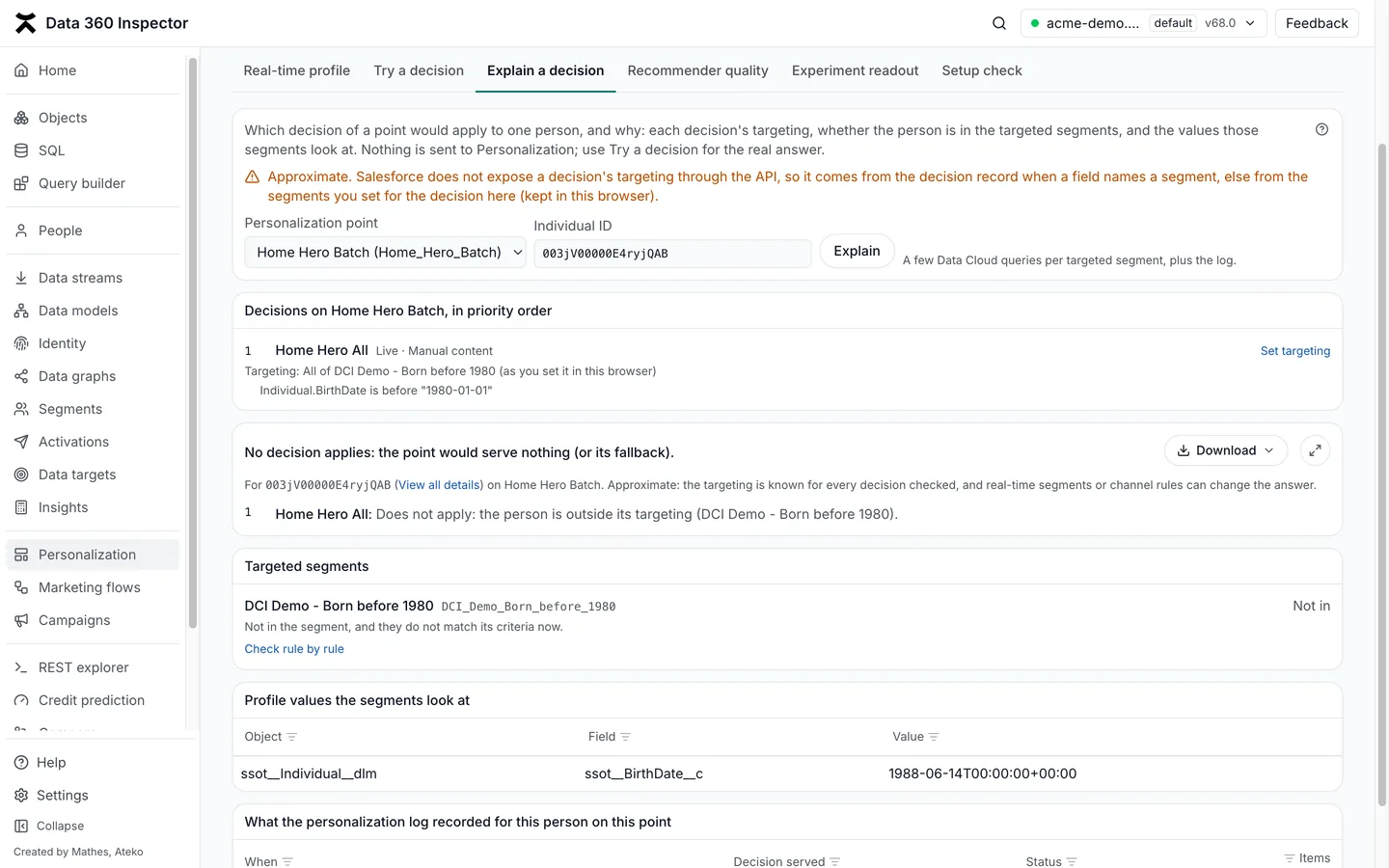
My demo org has one point, Home Hero Batch, with one decision, Home Hero All. To try it, I set the decision's targeting to the segment DCI Demo - Born before 1980 and explained it for Jamie Green, a sample person born in 1988. The answer: no decision applies, so the point would serve nothing (or its fallback), because Jamie is not in the segment and does not match its criteria now. Without targeting set, the same explanation says "Possibly: Home Hero All (priority 1)" and asks for the segments it targets.
Below the answer, the page shows the evidence:
- Targeted segments, each with In, Not in or Unknown and a sentence, plus Check rule by rule (the segment check from Day 18).
- Profile values the segments look at, read from the person's record on the segment's object.
- What the personalization log recorded for this person on this point.
- The experiment cohorts this person was assigned to, when a decision is in an experiment.
A decision whose targeting is still unknown is taken as "everyone", and the answer then starts with "Possibly" instead of "Approximately". Nothing is sent to Personalization here: it is a few Data Cloud queries per targeted segment, plus the log.
Try a decision
Explain a decision is a reconstruction; Try a decision asks Personalization for its own answer.
This is the one place where Data 360 Inspector sends something that is not a plain read. It calls Salesforce's standard action getPersonalizationDecisions on the org's REST API, as you, with the session the extension already uses. No token, Connected App or Apex is needed, and the org needs API version 63.0 or later. A decision request changes no data or setup, but it is a real request: it counts toward decisioning usage and is written to the personalization log, and to experiment results when the point is in an experiment.
So it is off until you turn it on in Settings > Decision tests, and even then each request asks first.
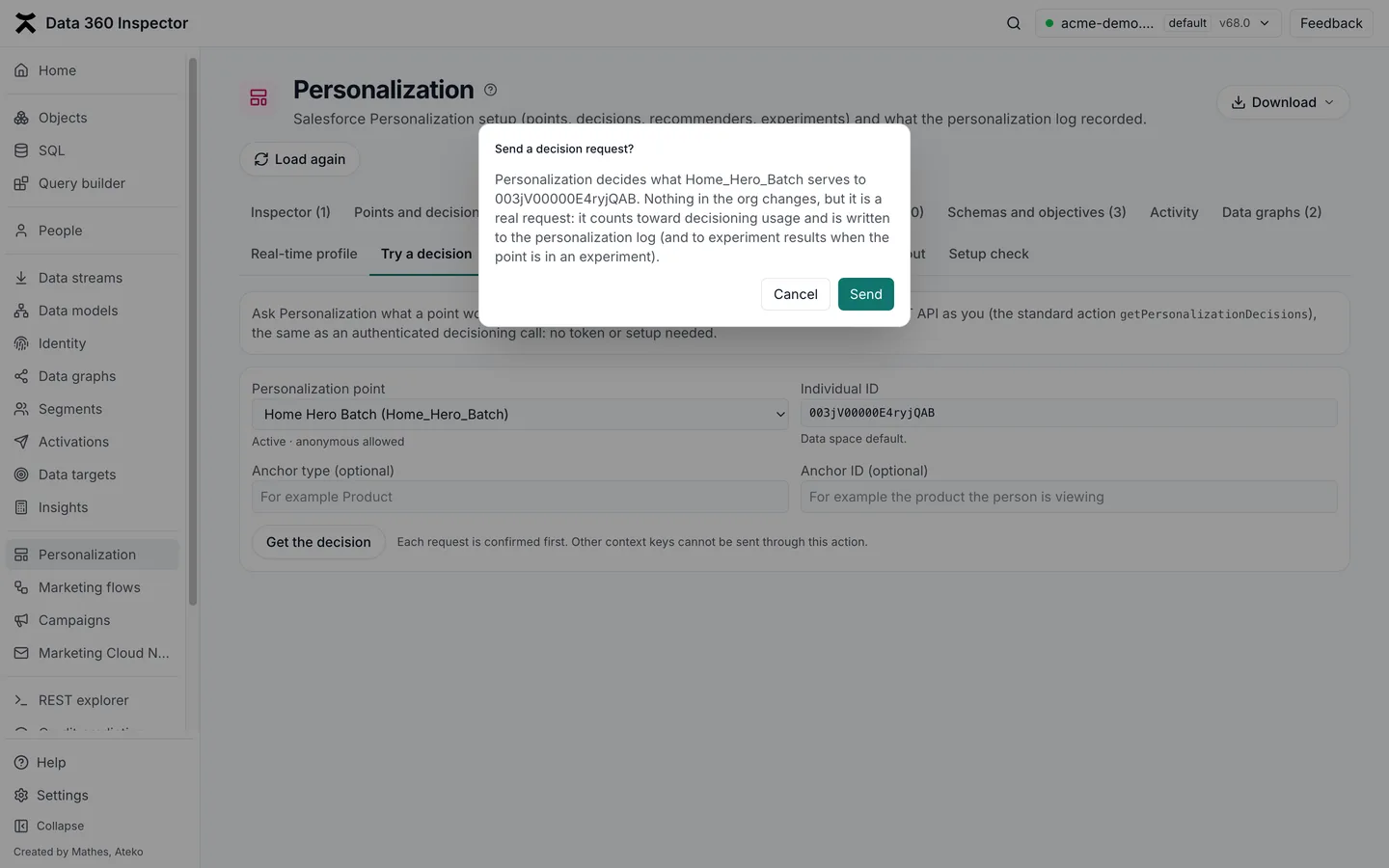
The form has four fields:
- Personalization point, with its status and whether it serves known people only.
- Individual ID, the ID the site sends, for example the web device ID.
- Anchor type and Anchor ID, optional, for example the product the person is viewing.
Get the decision shows what came back: the content attributes, any recommendations as a table, diagnostics in plain words, the request ID and the raw request and response. "Nothing served" means no decision matched or the person is outside every decision's targeting. Explain this decision on each answer opens the Explain tab with the same point and person, so Personalization's answer sits next to the reasons it probably had.
When I sent one request for Jamie Green on Home Hero Batch, the answer came back in about two seconds with the hero banner's attributes (header, subheader, background image, call-to-action text and URL, all placeholders in my demo org), the request ID with a note that it shows in the Activity tab once the log has it, and one diagnostic: UNDEFINED_CHANNEL, because the page sends no channel.
The service worker checks the setting on every request, not only the page. An administrator can forbid it for everyone with the policy key disableDecisionTests (Day 33 covers policies), and then the switch in Settings is greyed out.
Recommender quality
A recommender can be live and refreshed and still recommend the same five products to everyone. Recommender quality looks at its catalog and at what it served, each on a button.
Find item objects reads which Data Model Object (DMO) each recommender recommends from, else the page uses the item data graph's primary object.
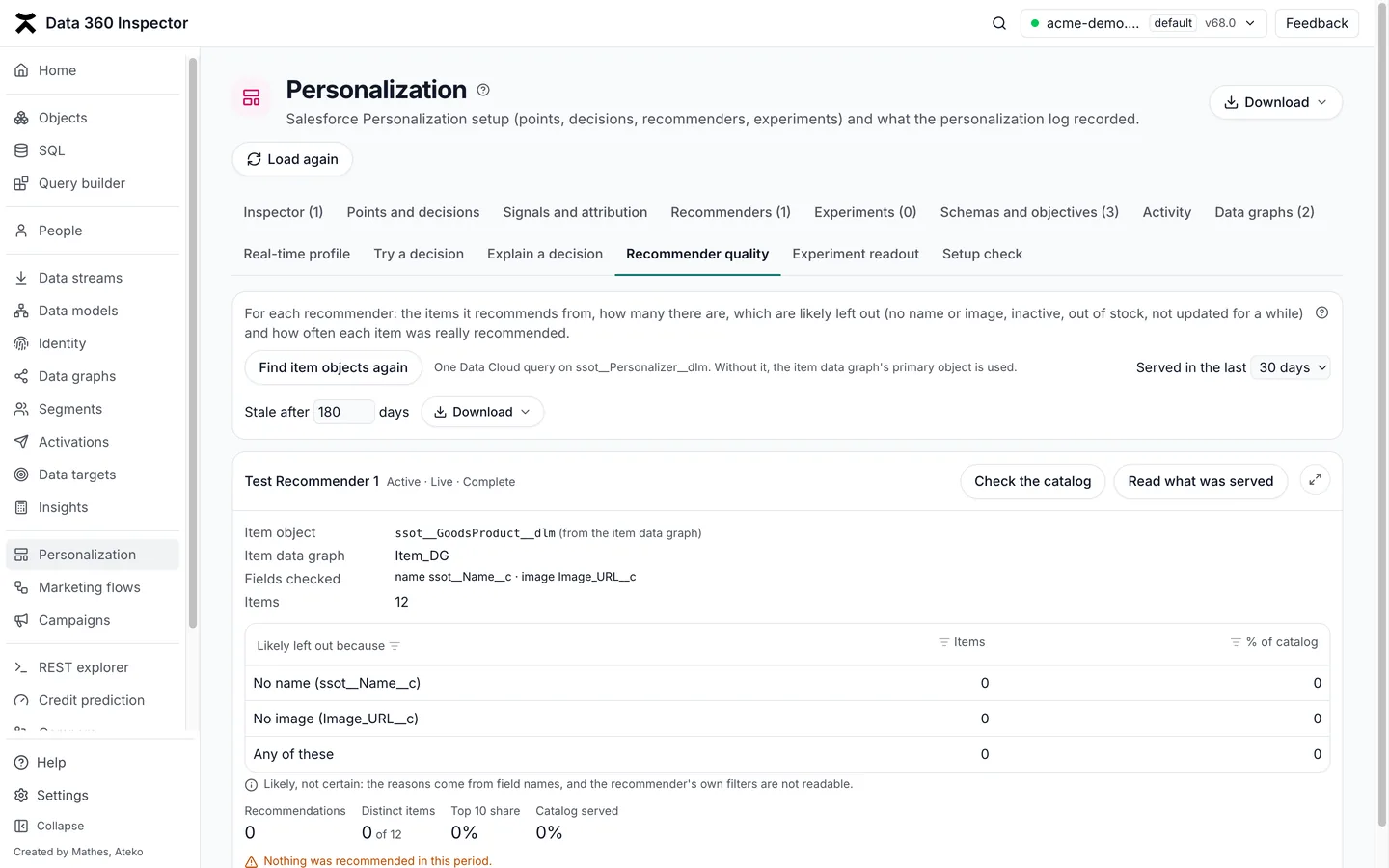
Check the catalog counts the items and how many are likely left out: no name, no image, inactive, out of stock, or not updated in 180 days (change it next to Stale after). The reasons come from field names, so the table says "Likely left out because", and up to 25 examples show which items and why.
Read what was served reads the recommendation item log for the last 7, 30 or 90 days: recommendations served, distinct items, the share of the top 10 items and how much of the catalog was ever served. Notes flag the patterns worth a look, such as the top 10 items making up half of everything recommended, or under 20% of the catalog ever being served.
In my demo org, Test Recommender 1 is active and live on the Item_DG item data graph. Find item objects takes its item object from that graph, ssot__GoodsProduct__dlm, and Check the catalog finds 12 items, none of them missing a name or an image. Read what was served finds nothing recommended in the last 30 days, so the catalog is fine and the recommender is simply not being called yet.
Experiment readout
The last tab answers "is variant B winning?". Read traffic and results runs two Data Cloud queries, on the experiment log and on Salesforce's experiment summary, for the last 14, 30, 90 or 365 days.
Traffic split puts each cohort's planned share next to the share of people it got. With 1,000 people or more, a share over three standard errors from the plan is flagged as a sample ratio mismatch, which makes results unreliable.
For outcomes, Salesforce's summary gives converted and total per cohort for each metric, with its own chance to beat the control. When the summary is empty, pick an outcome (placed an order, added to cart, viewed a product, any website engagement) and Count people who had it after their first assignment. That second count is approximate, and the page says so.
Each variant is then compared with the control using a two-proportion z-test, written as a sentence:
- Not enough data yet, until each variant has 100 people and at least 5 conversions and 5 non-conversions.
- Ahead or behind, likely real, below p = 0.05.
- Ahead or behind so far, not conclusive yet, below p = 0.2, with "Keep it running".
- No clear difference yet, otherwise.
My demo org has no experiment, so the tab says "No experiments in this data space." and lists what a readout needs: an experiment with two or more cohorts started in the Personalization app, and decision requests while it runs.
Limits
A few things to know:
- Explain a decision is approximate. Targeting comes from your settings unless the org exposes it, and real-time segments or channel rules can change the answer.
- Try a decision sends no channel, so channel-specific decisions are not considered, and the action takes no context keys beyond the individual, data space and anchor.
- Recommender filters and boosts are not readable, so "left out" is a guess from field names.
- The experiment and recommendation log objects were seen only without rows, so the readout and the served numbers wait for a first check with real traffic.