 Data 360 Inspector
Features · Health and governance
Freshness and consent coverage
Freshness in dependency order, and personal data and consent coverage.
Video coming soon.
From the article Is the data behind this segment fresh, and do we have consent for it? (part 24 of the series).
A segment can publish on time, every time, and still send old data. If the data stream that feeds its Data Model Object (DMO) failed this morning, the segment publishes faithfully from what was there before, and Health shows the segment as OK. The failure is upstream, on a different page, and nothing in Salesforce Data Cloud connects the two for you.
The other question on the same page is one I get from privacy and security teams: which fields hold personal data, and how many of our email addresses and phone numbers have a consent record?
Today covers the two other parts of the Health page: Freshness, which follows the data through every step, and the personal data and consent coverage report under it.
Freshness, in dependency order
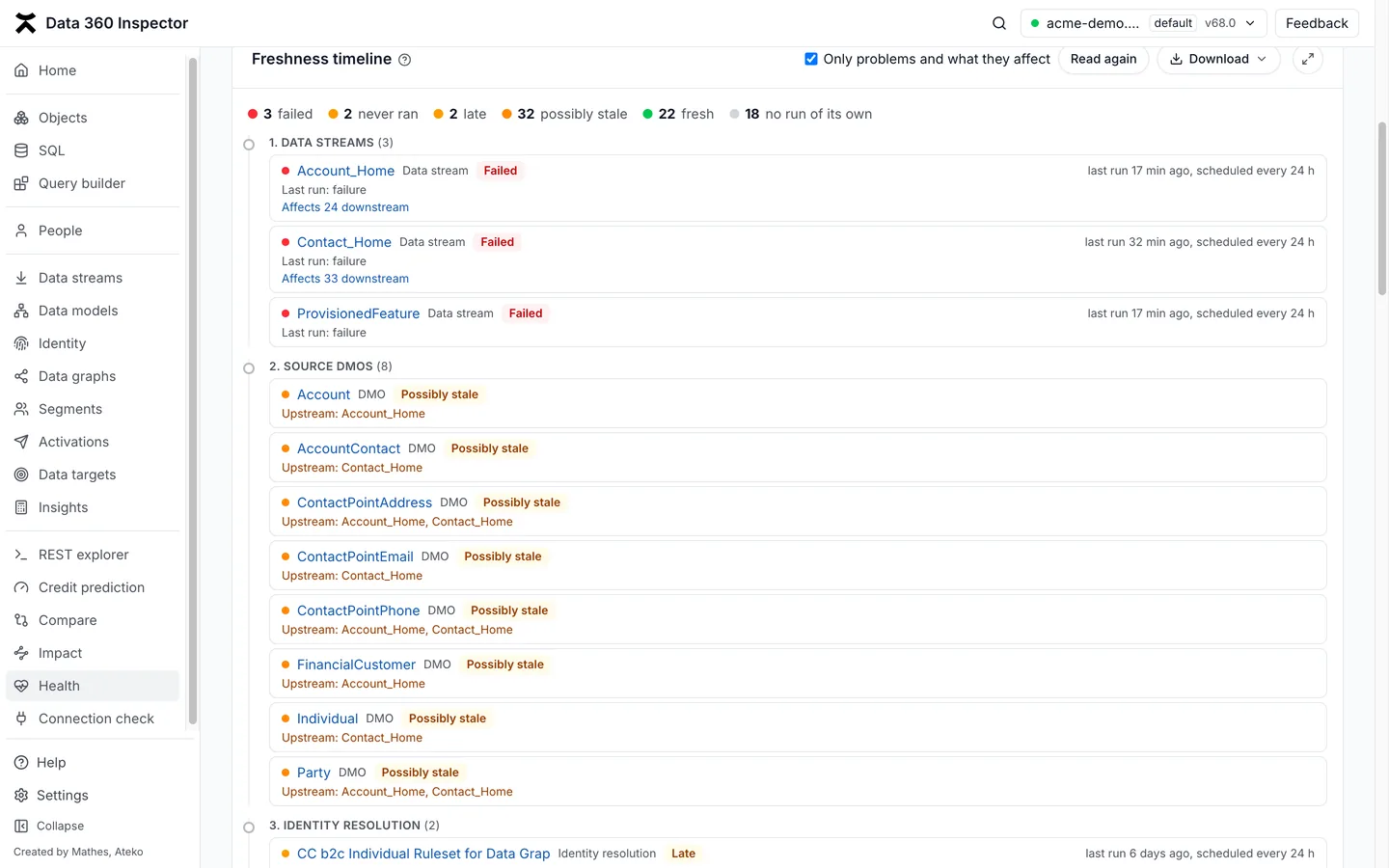
The Problems, Everything and Freshness switch on Health opens the Freshness timeline. Build the timeline puts every step of the pipeline in the order data flows through it, numbered:
- Data streams
- Source DMOs
- Identity resolution
- Unified DMOs
- Calculated insights
- Data graphs
- Segments
- Activations
It uses the Health check you already have, plus the stream mappings, insights, segments, activations, identity rulesets and data graphs that other pages keep, and reads any of them that are not kept yet. It runs no Data Cloud SQL of its own.
A line at the top counts the states; on my demo org it read "3 failed, 2 never ran, 2 late, 32 possibly stale, 22 fresh, 18 no run of its own". Each row has a dot, the name (linked to its page), the kind, a state badge, and "last run 17 min ago, scheduled every 24 h" when it has a schedule. The states are Failed, Never ran, Late, Possibly stale, Running, Inactive, Fresh and No run of its own (for DMOs, which are as fresh as what fills them). Late means more than twice the schedule interval, plus an hour, has passed since the last run: both identity rulesets on the demo org, scheduled every 24 hours, last ran 6 and 17 days ago.
How "possibly stale" travels
The timeline links each step to what it reads:
- A data stream feeds the DMOs its mappings fill.
- An identity resolution ruleset reads its source DMOs and writes the unified and link DMOs.
- A calculated insight reads the objects (and other insights) named in its SQL.
- A data graph reads the objects in its tree.
- A segment reads its own object and every object in its criteria.
- An activation follows its segment.
When a step failed, never ran or is late, every step downstream of it is marked Possibly stale, with "Upstream:" and the names of the steps to blame. That is the case from the opening. On the demo org, Contact_Home failed half an hour before I built the timeline, and every segment, published an hour earlier and OK on the Problems view, shows Possibly stale with "Upstream: Contact_Home". When the problem reaches a step through another step of its own, such as a segment built on another segment, the line names that step too: Emailable Account Execs reads "Upstream: Contact_Home, through the segment DCI Demo - Account Execs".
A failed step also gets Affects N downstream, which opens the list of everything it touches: 33 for Contact_Home. And a step that ran before its source last refreshed says so: "Ran before X last refreshed: the newest data arrives at its next run."
Only problems and what they affect is ticked by default, so a healthy org shows a short line instead of hundreds of green rows. Untick it for every step. Read again rebuilds it, and Download gives the timeline as a document or a spreadsheet, with the reason for each state.
Fields that probably hold personal data
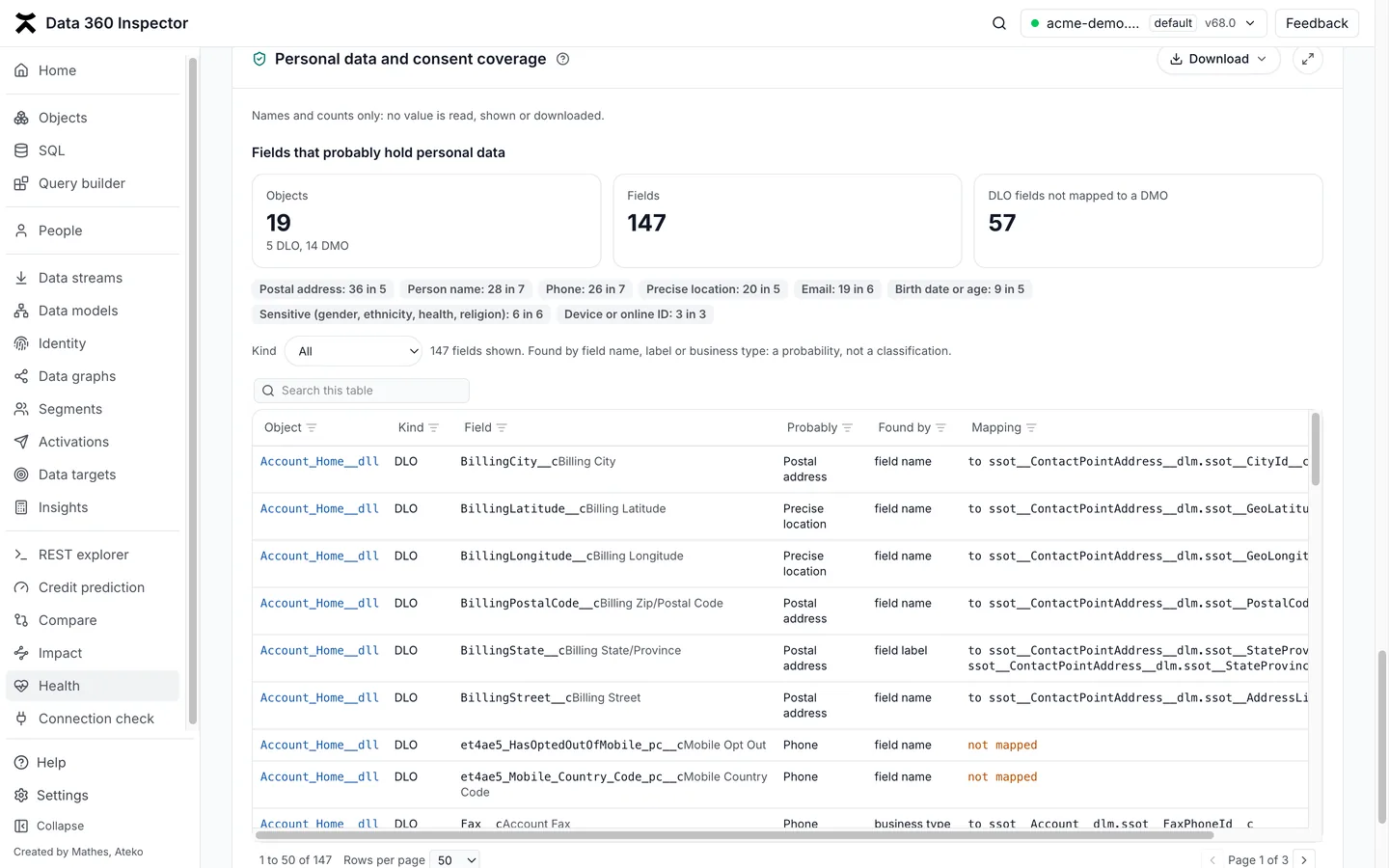
Below the Health views sits a card called Personal data and consent coverage. Its first line sets the rule for the whole card: "Names and counts only: no value is read, shown or downloaded."
The first part lists the fields that probably hold personal data, from the object list the Inspector already has, without any query. A field is matched by its name, its label, or the business type Data Cloud gives it, into one of these categories:
- Email, phone, person name and postal address.
- Birth date or age.
- Government ID, such as a passport or tax number.
- IP address, device or online ID, and precise location.
- Sensitive: gender, ethnicity, health or religion.
Key qualifier fields, system fields and fields that are IDs of a contact point or party are left out, since they do not hold the value itself.
Three tiles give the objects with such fields (split into Data Lake Objects (DLOs), DMOs and calculated insights), the number of fields, and the DLO fields not mapped to a DMO. That last one needs the mappings, which Read the mappings loads when no other page has kept them yet. The category chips and the Kind menu filter the table, which lists each field with its object, what it probably is, how it was found, and where it is mapped: "to" a DMO field for a DLO field, "from" DLO fields for a DMO field, or "not mapped".
On the demo org that is 147 fields in 19 objects (5 DLOs and 14 DMOs), and 57 DLO fields not mapped to a DMO. I find the "not mapped" rows the most useful. They are personal data that Data Cloud ingests and stores but that nothing uses, which is worth a conversation about whether to bring it in at all. The two mobile fields on Account_Home in the image, a mobile opt-out flag and a mobile country code, are that kind.
Consent coverage by channel
The second part answers the consent question with counts. Count consent coverage counts, for email and phone, in two places:
- Data Cloud, with aggregate SQL on the contact point email and phone DMOs, and the Contact Point Consent DMO when the data space has one.
- Salesforce records, with aggregate SOQL on the contact point records and the two consent objects: ContactPointConsent at the contact point level and CommSubscriptionConsent at the contact point and subscription level.
The table has one row per source and channel: the individuals, how many have that channel (and the share), the contact points, how many have a consent record (and the share), how many have none, and the counts by consent status. In Salesforce records, "with a consent record" means at least one consent at either level, since the two overlap. When the data space has no Contact Point Consent DMO, the card says so ("contact points only") and the Data Cloud rows show a dash for consent. Counts that cannot be read, usually because an object does not exist in the org, are listed under the table with the reason.
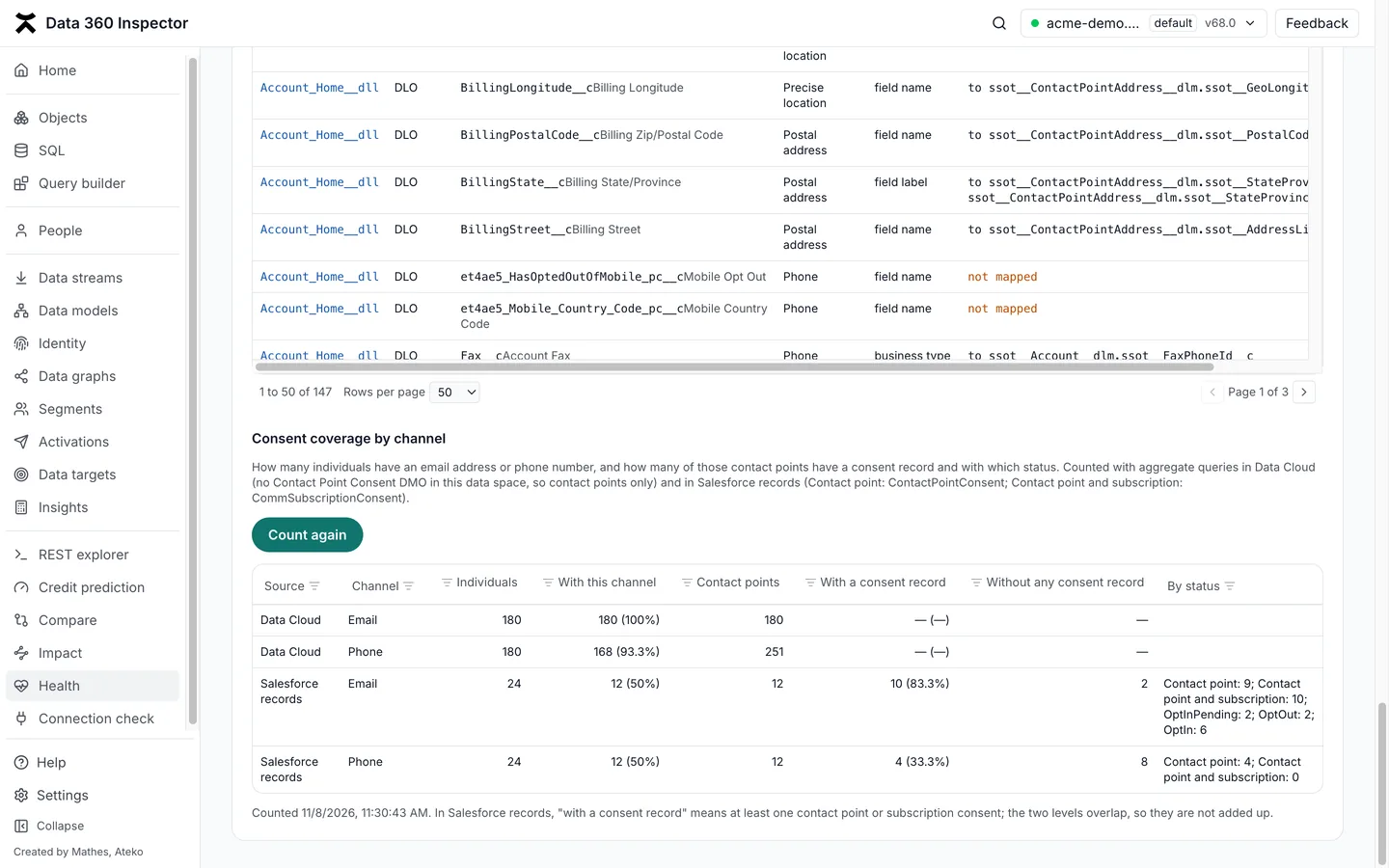
On the demo org, 10 of the 12 email contact points in Salesforce have a consent record, and only 4 of the 12 phone numbers do. That second number is the one I would take to the privacy team.
Download gives both parts, field names and counts only, with a section on how the fields were found.
Limits
A few things to know:
- Freshness is as current as the Health check it builds on. Check again first if that check is old.
- The Late rule (twice the schedule plus an hour) and the daily expectation for automatic rulesets are my assumptions.
- The personal data list is a probability from names, labels and business types. A field called "attr_7" that holds emails will not be found, and a field called "Address Type" may be flagged.
- The Contact Point Consent DMO name and fields are a guess that has not been seen on an org yet. When it is refused, the error shows on that count.
- The Data Cloud "with this channel" count keeps only parties that are individuals, while Contact points counts every row, accounts included. On my demo org that is 168 people with a phone and 251 phone contact points.
- Consent coverage counts consent records of any status. The By status column gives the split between opted in and opted out.
The Inspector is free on the Chrome Web Store: https://chromewebstore.google.com/detail/data-cloud-inspector/ghiojkipoephhlkcgcgochoihogiahog