 Data 360 Inspector
Features · Health and governance
Compare over time
Metadata snapshots and what changed since.
Video coming soon.
From the article What changed in my Data Cloud org since last week? (part 28 of the series).
"Who changed this segment?" is a question Salesforce Data Cloud does not answer easily. A segment's criteria, a calculated insight's SQL or a data stream's mapping can change between two runs, and the setup pages show only how things are now. When a count drops on Monday, the first job is to find out whether anything in the setup moved over the weekend.
A snapshot is a copy of the definitions
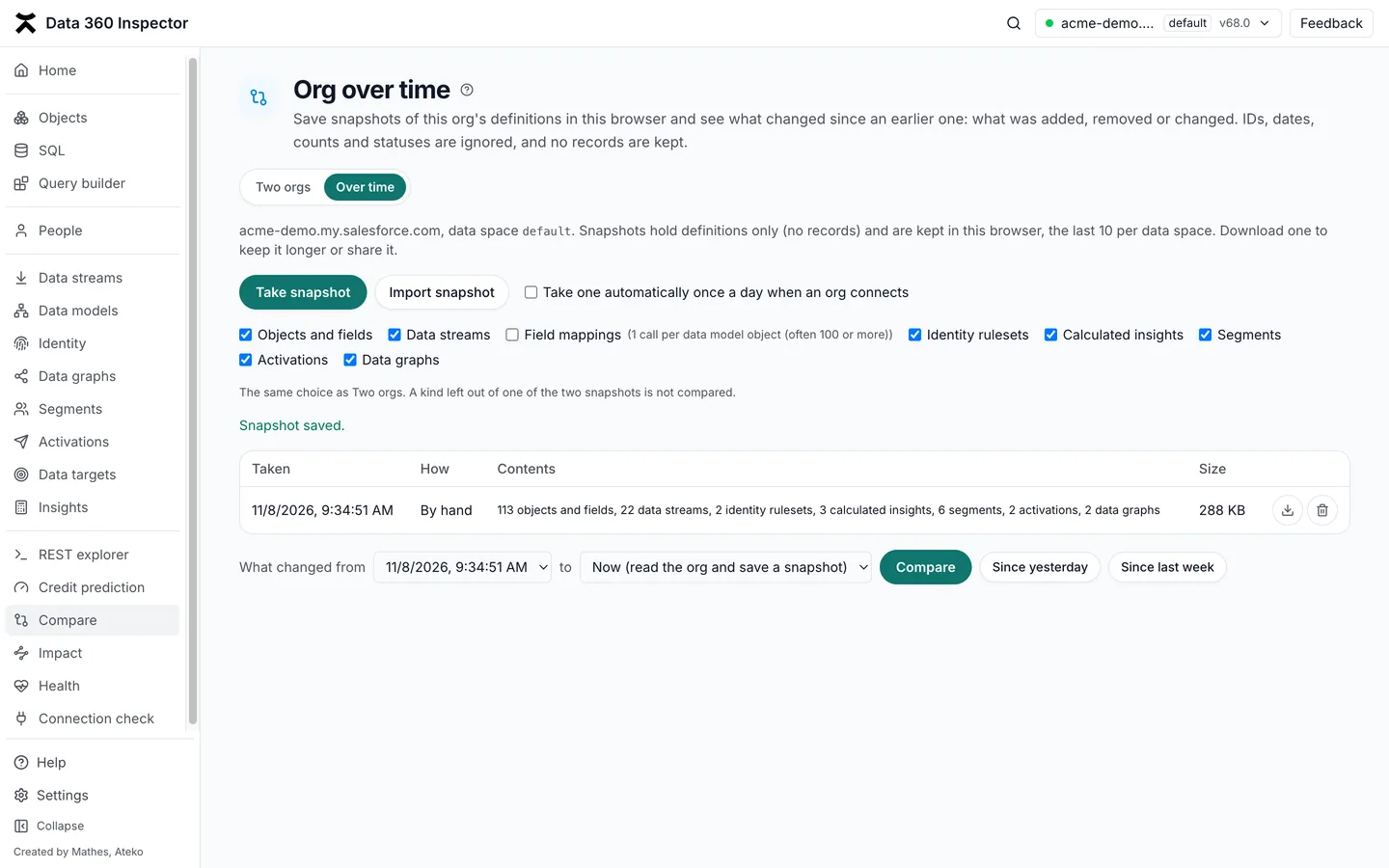
Compare > Over time (the page heading changes to Org over time) works on the org and data space you are connected to. Take snapshot reads the same definitions that Two orgs reads and saves them in this browser with the date and time.
Snapshots hold definitions only: objects and fields, data streams, identity rulesets, calculated insight SQL, segment criteria, activations and data graphs. They hold no records, and, as on Two orgs, IDs, dates, counts and statuses are left out.
The checkboxes choose what a snapshot reads, and they are the same choice as on Two orgs. Field mappings are off by default here too, because they take one call per Data Model Object (DMO).
The table lists each snapshot with when it was taken, how (By hand, Daily or Imported), what it holds and its size. My first snapshot of the demo org holds "113 objects and fields, 22 data streams, 2 identity rulesets, 3 calculated insights, 6 segments, 2 activations, 2 data graphs" in 288 KB. If a kind could not be read, the Contents column says so, so a snapshot with no segments because the read failed is not mistaken for an org with none.
What changed since then
Under the table, "What changed from" picks an earlier snapshot, and "to" picks a later one or Now. Now reads the org again, saves that as a new snapshot, and compares the two. Since yesterday and Since last week pick the newest snapshot that is at least that old (or the oldest one you have) and set the other side to Now.
The comparison runs in the background, like Two orgs, and the result uses the same layout with words that fit a timeline:
- Removed: in the earlier snapshot, not in the later one.
- Added: in the later one only.
- Changed: in both, defined differently, with the same tables and line diffs as Two orgs.
- Unchanged: the rest, listed when you untick Show only changes.
Each kind has a tile with its counts, and each changed item shows what moved: a field added to a DMO, a segment's criteria with one line changed, a calculated insight whose SQL gained a condition. The diffs show inline or side by side, and the SQL is compared without comments, extra spaces or case differences outside quoted values.
In the demo org I compared my first snapshot with Now two minutes later. Nothing had changed in setup, so every tile shows zero removed, added and changed, and the page says "Nothing changed in what was compared." That is also a useful answer on a Monday: it rules out setup and sends you to the data.
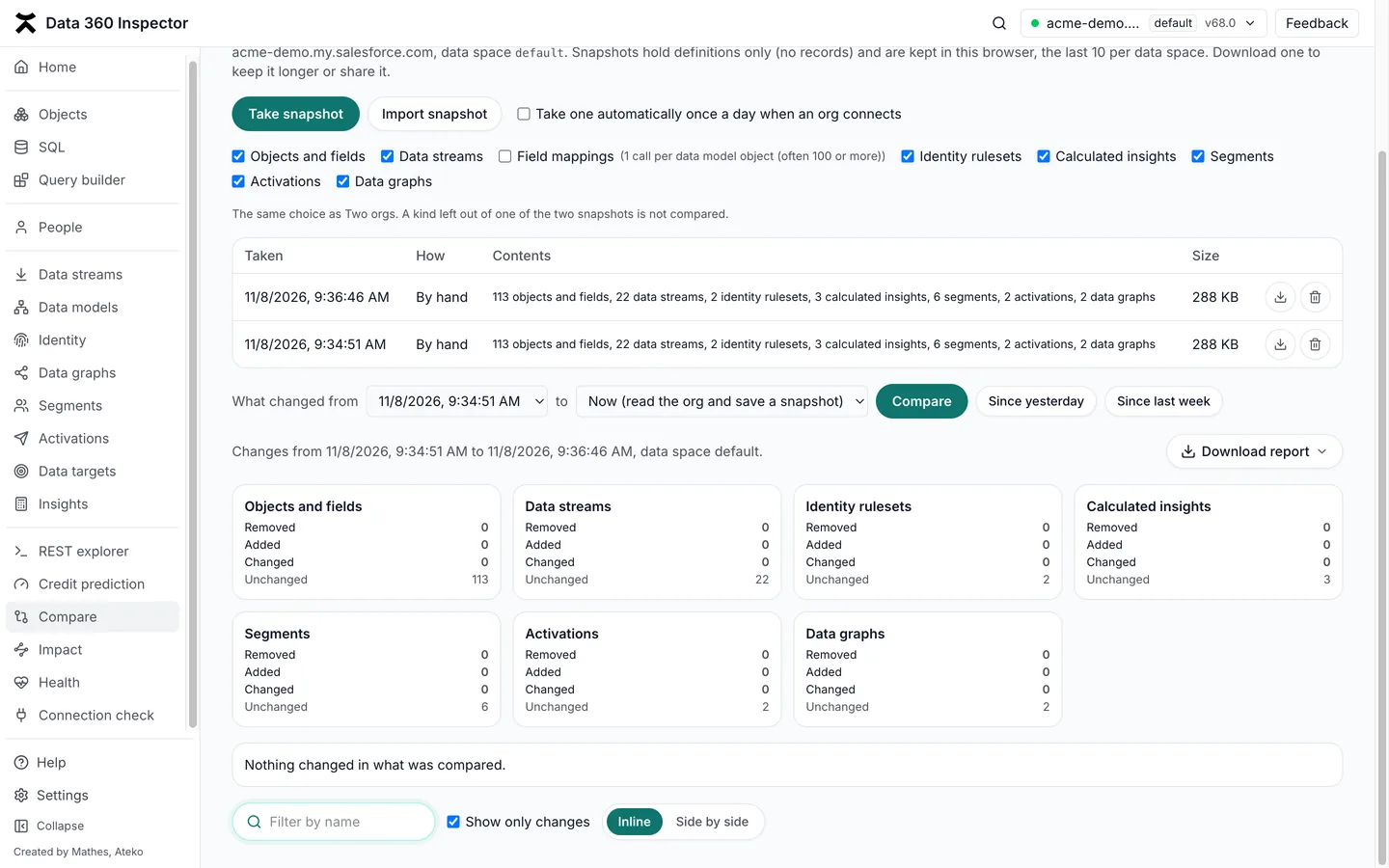
Download report gives the changes as Markdown, Word, PDF or HTML, with a summary table per kind and the line diffs, or as Excel with a Summary and a Changes sheet. I attach it to the Monday message that starts with "this is what changed in setup since Friday".
The daily snapshot
A snapshot nobody took is no help when the question comes. "Take one automatically once a day when an org connects" does that: when you open the extension on an org and its data space has no snapshot younger than a day, it takes one in the background, about half a minute after connecting. The table marks it Daily.
It is off by default, because each snapshot makes calls to the org and uses browser storage, and I would rather you choose that.
Keeping and sharing snapshots
The browser keeps the last 10 snapshots per org and data space, and deletes the oldest one when an eleventh is saved. If browser storage runs out, cached org data goes first, then the oldest snapshots of any org.
To keep one longer, download it as JSON with the icon on its row. Import snapshot reads such a file back, after checking that it is a Data 360 Inspector snapshot with an org ID and a date. A snapshot of another org or data space imports too, and shows when that org and data space are selected.
That also makes snapshots a way to share a point in time: a colleague can send the JSON from before their change, and you can compare it with the org now.
Limits
A few things to know:
- Over time compares definitions only. A segment whose count halved with unchanged criteria shows as unchanged.
- A snapshot tells you what changed, not who changed it or exactly when, only that it happened between two snapshots.
- A kind left out of one of the two snapshots is not compared, and the result says so.
- Snapshots stay in one browser. A colleague's snapshots are not yours unless they send the file.
- When your administrator turns off the cache through the extension's policy, snapshots last only until the browser closes, and the page says so. Download the ones you want to keep.
- A snapshot over 9 MB is not kept; the message suggests leaving out field mappings or objects.